Miss Kitty Warholized
Tuesday, March 11, 2008


Thing 5 - More Fun with Flickr
I've been playing with some of the photo sharing and mashup features of Flickr as I have gone along. I really like the ease of use of jd's Flickr Toys at Big Huge Labs:
I made a jigsaw of a beautiful fireworks photo I found at either Pastynet or at Quietlywild.
I made a trading card of my beautiful deceased Miss Kitty, who was a very special cat.
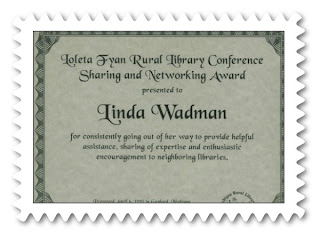
The postage stamp of my grandson reading was done with Framer. A similar stamp was made after using Picnik to edit a scan of an award I got from the Library of Michigan at a Rural Library Conference in 1995, but using another Flickr application.
I tried a Warholizer of Miss Kitty from the same photo as I used on the trading card, but there just was not enough contrast in the photo. I suppose I could edit this post and include it to show how it turned out. The image is saved on another computer. I'll try to remember to add it later.
I made a slide show of a small selection of photos of UP photographer extraordinaire Dan Urbanski since they are posted in a large collection of his work available online and put a link to it in a favorite things element of the blog . Not really sure of the copyright implications of this, but since they are freely available online and I used just a few and compiled them into a slide show for entertainment, not profit, and credited his work, I would hope it could be construed as sharing them, the same as his website "Quietlywild.com" does. And it seemed fitting to put a link to my niece Sara's music with it since Sara worked for Dan at his photography studio and is in many of the photos at "Quietlywild".
There are so many assorted types of applications that can be used with Flickr and the list is growing, so it seems like a place to come often and check out what's there and how it works. I did enjoy the Tagman game (like Hangman) but tied to tags in Flickr. It could be addicting like playing Solitaire in Windows is, at least for someone who likes words and spelling. Also liked the postcard viewer where I put in "Lake Superior" as the tag and got many beautiful images from Flickr.
So many things to try, so little time to play with them! I can think of many ways to use these features to promote a library in colorful ways in print and online. Even libraries with small budgets can afford to use these tools as most of them are free. Brochures that look professional could be printed inexpensively on existing library equipment for the small cost of supplies.
I made a jigsaw of a beautiful fireworks photo I found at either Pastynet or at Quietlywild.
I made a trading card of my beautiful deceased Miss Kitty, who was a very special cat.
The postage stamp of my grandson reading was done with Framer. A similar stamp was made after using Picnik to edit a scan of an award I got from the Library of Michigan at a Rural Library Conference in 1995, but using another Flickr application.
I tried a Warholizer of Miss Kitty from the same photo as I used on the trading card, but there just was not enough contrast in the photo. I suppose I could edit this post and include it to show how it turned out. The image is saved on another computer. I'll try to remember to add it later.
I made a slide show of a small selection of photos of UP photographer extraordinaire Dan Urbanski since they are posted in a large collection of his work available online and put a link to it in a favorite things element of the blog . Not really sure of the copyright implications of this, but since they are freely available online and I used just a few and compiled them into a slide show for entertainment, not profit, and credited his work, I would hope it could be construed as sharing them, the same as his website "Quietlywild.com" does. And it seemed fitting to put a link to my niece Sara's music with it since Sara worked for Dan at his photography studio and is in many of the photos at "Quietlywild".
There are so many assorted types of applications that can be used with Flickr and the list is growing, so it seems like a place to come often and check out what's there and how it works. I did enjoy the Tagman game (like Hangman) but tied to tags in Flickr. It could be addicting like playing Solitaire in Windows is, at least for someone who likes words and spelling. Also liked the postcard viewer where I put in "Lake Superior" as the tag and got many beautiful images from Flickr.
So many things to try, so little time to play with them! I can think of many ways to use these features to promote a library in colorful ways in print and online. Even libraries with small budgets can afford to use these tools as most of them are free. Brochures that look professional could be printed inexpensively on existing library equipment for the small cost of supplies.
Friday, March 7, 2008
Thing 4 - Flickr
After viewing the Common Craft video,I finally broke down and created a Flickr account. It is a concern that some disaster might occur and precious photos might be lost. With the ability to store some of them free, keep them private if you wish, and add tags to find them more easily, I thought "Why not". It helped that I already had a Yahoo account and didn't have to keep track of yet another login and password. I uploaded a few pictures to the account just to see how it worked and will do more later. I tagged the photos and divided them into sets. There's a limit of three sets with the free account so you need to be thoughtful about creating them.
I had previously explored the site and have been playing with some of the fun Flickr things as a reward to myself after reading blogs. (I needed to know how some of the tools worked so that I could answer questions about how to do some of the things that others were having problems with.)
I checked out all the highlights in Thing 4. Loved the use of the "add a note" feature in libraries! Hours could be spent exploring the LC collections, comments and tags if ever there was the time.
I finally remembered to bring my camera to work (my kids who got me the camera so I would have something small to carry with me and catch those "aha" photo opportunities would like it if I carried it with me all the time as they intended, but it's a hard habit to adopt. Ever since I missed the opportunity of capturing the fall migration of swans (seemed to be a hundred or more) in the bay near Ashland I 've been taking it when I travel.) Since I don't have a "library" per se, I took a picture of our office nameplate and an award I won while a public librarian in Michigan. I uploaded the pictures to Flickr and attempted to add them to this post. Only it's not happening today. Google has some issues with Blogger currently and uploading photos is one of them. So I saved my draft to try again Saturday with no more success than Friday night. On Saturday posts were readable but not able to post when I checked. Since I am getting the same message today (Sunday) after clearing my cache, Google's Blogger is apparently still having issues. I guess I won't finish this thing today, at least not with photos from Flickr. Uploading from my computer didn't work either so I'll wait and try again when their problems are resolved. But I will publish the post and try to edit it to add pictures at a later time.

I had previously explored the site and have been playing with some of the fun Flickr things as a reward to myself after reading blogs. (I needed to know how some of the tools worked so that I could answer questions about how to do some of the things that others were having problems with.)
I checked out all the highlights in Thing 4. Loved the use of the "add a note" feature in libraries! Hours could be spent exploring the LC collections, comments and tags if ever there was the time.
I finally remembered to bring my camera to work (my kids who got me the camera so I would have something small to carry with me and catch those "aha" photo opportunities would like it if I carried it with me all the time as they intended, but it's a hard habit to adopt. Ever since I missed the opportunity of capturing the fall migration of swans (seemed to be a hundred or more) in the bay near Ashland I 've been taking it when I travel.) Since I don't have a "library" per se, I took a picture of our office nameplate and an award I won while a public librarian in Michigan. I uploaded the pictures to Flickr and attempted to add them to this post. Only it's not happening today. Google has some issues with Blogger currently and uploading photos is one of them. So I saved my draft to try again Saturday with no more success than Friday night. On Saturday posts were readable but not able to post when I checked. Since I am getting the same message today (Sunday) after clearing my cache, Google's Blogger is apparently still having issues. I guess I won't finish this thing today, at least not with photos from Flickr. Uploading from my computer didn't work either so I'll wait and try again when their problems are resolved. But I will publish the post and try to edit it to add pictures at a later time.


Wednesday, March 5, 2008

Monday, March 3, 2008
Thing 3 - RSS Feeds
RSS feeds literally bring the world you choose to your doorstep and using Google Reader lets you move that doorstep around to wherever you are. (Unless,of course, you're at the cabin without electricity.)
I tried using Internet Explorer's feed but I don't always use Internet Explorer. I don't like IE. I like the navigation features of Netscape much better and I mourn its demise. I've downloaded Firefox and find it similar enough that I suspect I will use it more than IE. So I thought I would try Google Reader since I already have a Google page and a Blogger account. It's simply to avoid having to use another username and password combination to remember. (But I plan to check out Passwordsafe.com mentioned in Bridget's Twig which sounds as nifty as RSS Feeds and allows you to access all your passwords from anywhere.) I live in fear of losing my little notebook whick contains everytihng I need to access my online resources.
Google Reader is ideal for me to keep track of the progress of blogs in the 23 things project. I can be notified when there are changes and not have to check each blog everyday. Talk about a time saver! It could easily be used to monitor other types of similar projects or online learning.
I added news feeds, but find that for the most part I prefer going to the news web site and browsing, much like browsing in a library. After monitoring the news feeds for a few days, I eliminated most of them. Somehow there is satisfaction in browsing the eclectic conglomeration of information on news sites and using the RSS feeds for this leaves me thinking I might miss that odd tidbit the catches my fancy and leads me to explore new ideas or learn more about a subject. However, for specialized information RSS feeds would the be choice to have information delivered to me.
I tried using Internet Explorer's feed but I don't always use Internet Explorer. I don't like IE. I like the navigation features of Netscape much better and I mourn its demise. I've downloaded Firefox and find it similar enough that I suspect I will use it more than IE. So I thought I would try Google Reader since I already have a Google page and a Blogger account. It's simply to avoid having to use another username and password combination to remember. (But I plan to check out Passwordsafe.com mentioned in Bridget's Twig which sounds as nifty as RSS Feeds and allows you to access all your passwords from anywhere.) I live in fear of losing my little notebook whick contains everytihng I need to access my online resources.
Google Reader is ideal for me to keep track of the progress of blogs in the 23 things project. I can be notified when there are changes and not have to check each blog everyday. Talk about a time saver! It could easily be used to monitor other types of similar projects or online learning.
I added news feeds, but find that for the most part I prefer going to the news web site and browsing, much like browsing in a library. After monitoring the news feeds for a few days, I eliminated most of them. Somehow there is satisfaction in browsing the eclectic conglomeration of information on news sites and using the RSS feeds for this leaves me thinking I might miss that odd tidbit the catches my fancy and leads me to explore new ideas or learn more about a subject. However, for specialized information RSS feeds would the be choice to have information delivered to me.
Friday, February 22, 2008
Thing 2
I read and re-read and viewed the videos and did a lot of thinking about this Library 2.0 stuff. On the one hand, I can see many ways that these social technologies can be used to benefit libraries. We can use the tools to draw our patrons to us in ways we could not before. perhaps reaching new people.
However, libraries have always been social networking places. These technological tools will just allow us to reach out in new ways to a broader audience. The tools can be used to let our patrons contribute to what we do as well. a sort of community building tool. One would hope that the real human contact will not be lost by adopting technology.
Time? Where will we find it? Dedicated librarians have always worked more than a 40 hour week. (Just ask my husband who for twenty plus years only saw me in the evenings hidden behind Kirkus Reviews, Library Journal and Booklist.) On the fly here and there we'll need to make the time to begin to expand our technological outreach. We want to keep those people we serve in the traditional ways, but try to capture those who are only occasional users by reaching out and making it easier for them to get to us.
This 23 Things program will allow us to experiment and find those things we can use to make our lives easier. The ones we adopt will probably be those that can be picked up quickly, adapted easily, and are inexpensive. The technology we've already adopted is not cheap either in time or upkeep. While it has relieved us of some clerical tasks, it has sucked up dollars that could be used for traditional library materials. You know, the ones people like to curl up with on cold winter nights. We need to maintain a balance of services to satisfy our frequent users while trying to pull in new users to support us as well. It will require careful thought to pick and choose among the rapidly changing possibilities. It's a daunting but exhilarating future ahead.
However, libraries have always been social networking places. These technological tools will just allow us to reach out in new ways to a broader audience. The tools can be used to let our patrons contribute to what we do as well. a sort of community building tool. One would hope that the real human contact will not be lost by adopting technology.
Time? Where will we find it? Dedicated librarians have always worked more than a 40 hour week. (Just ask my husband who for twenty plus years only saw me in the evenings hidden behind Kirkus Reviews, Library Journal and Booklist.) On the fly here and there we'll need to make the time to begin to expand our technological outreach. We want to keep those people we serve in the traditional ways, but try to capture those who are only occasional users by reaching out and making it easier for them to get to us.
This 23 Things program will allow us to experiment and find those things we can use to make our lives easier. The ones we adopt will probably be those that can be picked up quickly, adapted easily, and are inexpensive. The technology we've already adopted is not cheap either in time or upkeep. While it has relieved us of some clerical tasks, it has sucked up dollars that could be used for traditional library materials. You know, the ones people like to curl up with on cold winter nights. We need to maintain a balance of services to satisfy our frequent users while trying to pull in new users to support us as well. It will require careful thought to pick and choose among the rapidly changing possibilities. It's a daunting but exhilarating future ahead.
Wednesday, February 6, 2008
Keeping up - Thing One
Even with the best of intentions, there just are not enough hours in the day to keep up with everything. So in my list of priorities, this blog has just kept falling to the bottom. To soothe my guilty conscience I took a few minutes to change the look of the page and add my avatar (created weeks ago and never added to the page.)
I am really enjoying the blogs of others and finding many with the same concerns as my own: information overload and how can I possible keep up with it all heading the list.
I hope that the "23 things" project will foster a sense of community and also spark ideas for using some of these new tools in library settings.
I am really enjoying the blogs of others and finding many with the same concerns as my own: information overload and how can I possible keep up with it all heading the list.
I hope that the "23 things" project will foster a sense of community and also spark ideas for using some of these new tools in library settings.
Subscribe to:
Posts (Atom)